PDF Sheet Music Player
A PDF sheet music player that follows your own pages.
The bar that’s sounding is marked on your PDF. Click any bar to start there.
For PDFs exported from notation software. Scans and photos aren’t supported.
Ready to upload
Uploading your score
Keep this page open until it’s done.
Checking your PDFs
Your score is uploaded
We’ll email you at when it’s ready, usually within 12 hours.
Your scoresThat didn’t go through
Only you can see your scores
Press play on Pachelbel’s Canon.
Press play and follow it bar by bar. The PDF page sits beside the notation, and a click on any bar there starts the music from it.
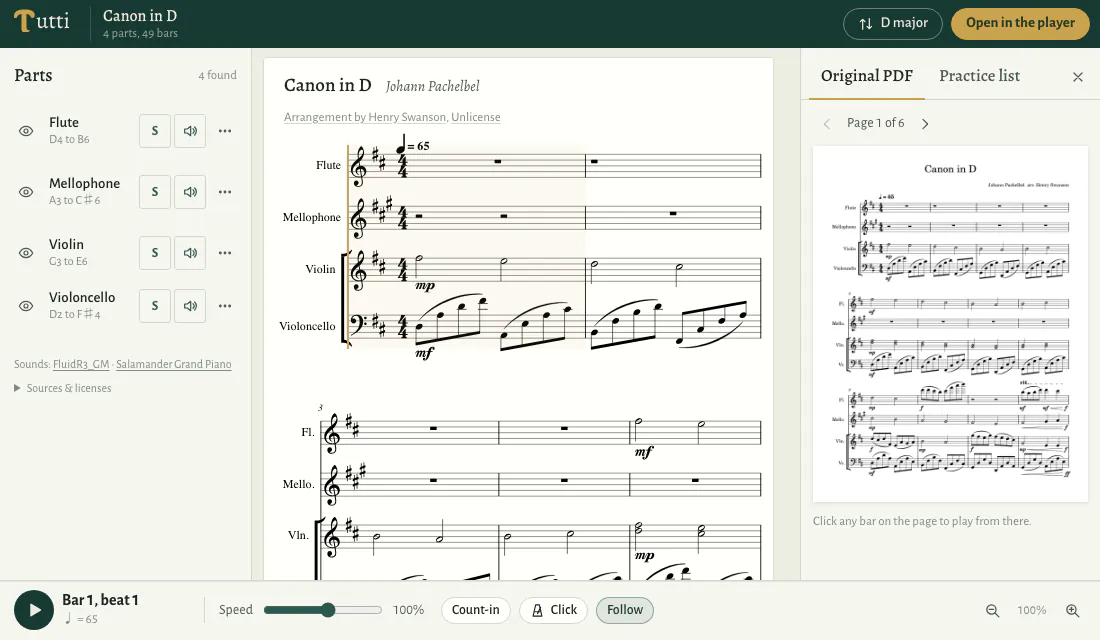
Your PDF, with the music running through it.
The bar that’s sounding, on the page
Your score plays from the notation read out of your PDF, and your own PDF pages stay open beside it. A box follows the bar that’s sounding on the PDF page, and the page turns when the music reaches the next one.
Start from any bar
Click a bar on the PDF page and playback starts there. In the notation, the notes that are sounding light up, and the view keeps the playing line in sight.
Practise the bars that need it.
Loop a passage
Drag across the bars you’re learning and loop them. Select several passages and they play in turn. Between repeats, count in one bar, two bars, or go straight on.
Keep a practice list
Add a passage to your list, name it, write a note to yourself about fingering or breathing, and mark it New, Practising or Got it. Open the list as a sheet to play every passage in order, or print it.
Find the hard spots
Ask for the hard spots and the bars that need the most work are marked on the score map, with passages for each part ready to add to your list.
Play it at the speed you can manage.
From 40% to 150%
Set the speed anywhere from 40% to 150% of the score’s tempo. Turn on a click on every beat, and a bar of count-in before the music starts.
A little faster each time
Start a loop slowly and let each repeat run a few percent faster, up to the speed you set. Once it gets there, it keeps looping at that speed.
PDFs from notation software play best.
Sibelius, MuseScore, Dorico and Finale exports all work, and PDFs from other notation software can be uploaded too: if we can’t prepare one, we’ll email you to say so. A PDF printed from notation software works when the music is still saved as text and font characters. Scans, photos and handwritten pages are not supported.
Questions about playing a PDF.
Is it my own PDF on the screen?
Both your PDF and the notation read from it. The notation is the main view, and your PDF’s own pages stay open beside it, with the bar that’s sounding marked.
Can I hear one part on its own?
Yes. Solo it, put the other parts in the background, or mute them. You can also hide the staves you don’t need; a hidden part keeps playing until you mute it.
Does playing use my pages?
No. Uploading, playing, transposing, controlling parts and sharing use no pages. Pages are used only when you unlock them for export, one page each.
How long until I can play my score?
We’ll email you when your score is ready, usually within 12 hours. It will be waiting in Your scores.
Can someone else play it with me?
Yes. Share a link to your score. It opens for whoever has the link, doesn’t appear in search results, and you can turn it off at any time.
More ways to use a PDF score.
- Transpose PDF Sheet Music
Move a PDF score to another key.
- PDF to MIDI
Take a PDF score into your DAW.
- PDF to MusicXML
Open a PDF score in your notation software.