PDF to MIDI
Turn PDF sheet music into MIDI.
Hear it first, set the key and the parts, then take the MIDI to your DAW.
For PDFs exported from notation software. Scans and photos aren’t supported.
Ready to upload
Uploading your score
Keep this page open until it’s done.
Checking your PDFs
Your score is uploaded
We’ll email you at when it’s ready, usually within 12 hours.
Your scoresThat didn’t go through
Only you can see your scores
Listen before you export.
This is Pachelbel’s Canon as Tutti read it from a PDF. The MIDI you export from a score plays the same notes.
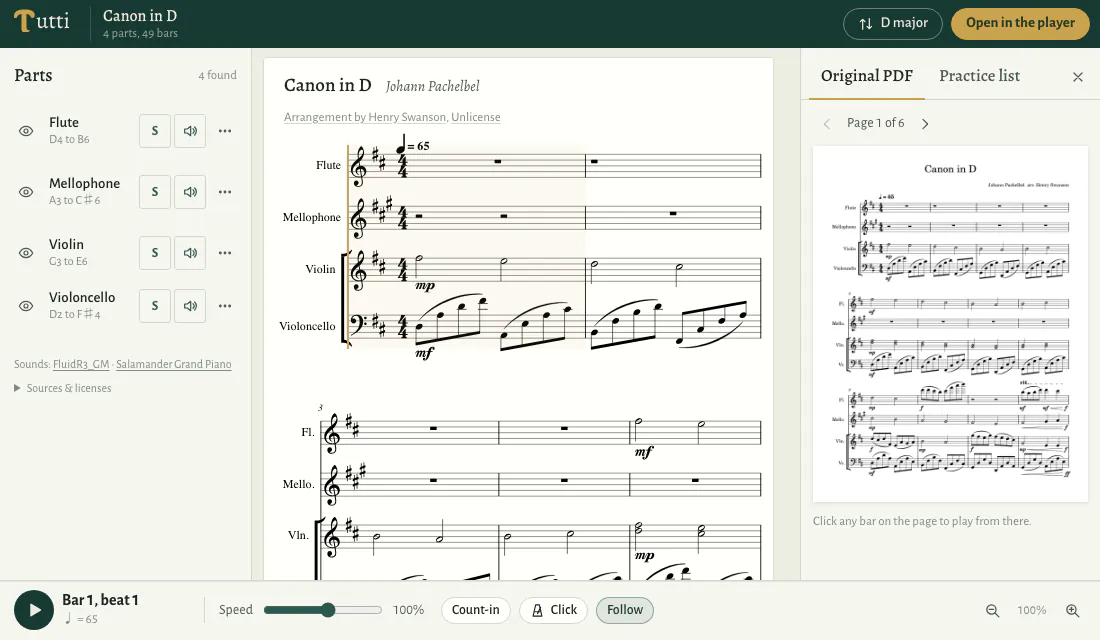
What your MIDI file holds.
What you see, in the key you chose
The MIDI follows the score as you’ve set it: the parts you show, the bars you keep, and the key you moved it to. The tempo marks in your score come with it.
What stays behind
Parts you hide and bars you fold away are left out. Muting a part only changes what you hear in Tutti: to leave it out of the MIDI, hide it. Titles, credits and the look of the page stay with the score.
Somewhere to take it.
Into your DAW
Open the file in Logic Pro, Cubase, Ableton Live, Reaper or any program that reads MIDI, and play the notes with the sounds you choose.
A backing track
Leave out the part you play, export the rest, and record yourself over it.
A mockup
Start an arrangement or a demo from the notes already in the score instead of playing them in again.
Notes read from the file, not guessed from a picture.
Scan recognition looks at the image of a page and guesses which notes it shows. A PDF exported from notation software already holds every note the program drew, and Tutti reads them from the file, so the pitches and rhythms in your MIDI come from the PDF itself. That is also why scans and photos aren’t supported: they hold only a picture of the music.
Questions about PDF to MIDI.
Does the MIDI keep my changes?
Yes. It is the score as you see it: in the key you chose, with the parts you show and the bars you keep.
Will a muted part be in the MIDI?
Yes. Muting changes only what you hear in Tutti. Hide a part to leave it out of the MIDI.
Can I export only some bars?
Yes. Fold away the bars you don’t need, or keep only the ones you want, and the MIDI joins the rest end to end.
How are MIDI exports counted?
The first time you export a score, as MIDI, MusicXML or a print, you choose which of its pages to unlock; each uses one page. The MIDI holds the bars on the pages you’ve unlocked, and exporting them again uses none. A few scores unlock as a whole.
Can I turn a scanned PDF into MIDI?
No. Tutti reads PDFs exported from notation software, such as Sibelius, MuseScore, Dorico or Finale, or printed from it with the music still saved as text and font characters. A scan holds only a picture of the music. If you have the notation file, export a PDF from it instead.
More ways to use a PDF score.
- PDF Sheet Music Player
Hear a PDF score and follow it on the page.
- Transpose PDF Sheet Music
Move a PDF score to another key.
- PDF to MusicXML
Open a PDF score in your notation software.